Jul 19, 2015

plainCanvas


I uploaded an add-on for Adobe Illustrator (CC 2014, 2015) which loads and executes Tool type script files using paper.js.

https://github.com/shspage/plainCanvas

You can export images drawn on it onto an artboard and also can import selected paths on an artboard onto it.

There're sample scripts that can be loaded in "scripts" folder.
I'm planning to add various type of scripts.

Jul 3, 2015

Distribute PointTexts by Anchor


Using Adobe Illustrator, assume that after you draw a table with point texts, and then you need to insert one more column, like above image.  Modifying the frame is rather easy work.  But how do you re-distribute the point texts?

If you use "Horizontal Distribute Space" button in Align palette, the result is "equally spaced" distribution (fig. A), which is not suitable in this case.  Additionally, you may be annoyed selecting only text objects to distribute (without paths).

I don't know whether there is a tip for this kind of work, I wrote a script for a tentative solution.

download: aicc_script_distribute_pointtext_anchors_en.zip -> http://shspage.com/ex/files.html

This script distributes point texts in the selection horizontal or vertical, in equally space based on their anchor points. (fig. B)  The objects rather than point text in the selection are ignored.

The orientation to distribute is determined automatically by the positions of the selected point texts.  If the width of the rectangle which encloses all the anchor point of them is greater than its height, the orientation is horizontal. Otherwise, it's vertical.

* If the orientation is horizontal, vertical position is aligned to the position of the leftmost text object.(Topmost for vertical.) (select fig. C and run this script results fig.B)
If you don't want this behavior, open the script with text editor and modify the value of "opts.align" (at the beginning part of the script) to "false".

Jun 16, 2015

new Layer Extension (ver.1.2.3)


I updated "new Layer", Adobe Illustrator Extension I posted before, to be compatible with CC2015.
The function is not changed at all.
I just changed upper limit of its supported version to 19.9 in the configuration file.

download: aicc_ext_newLayer123.zip -> http://shspage.com/ex/files.html

Apr 30, 2015

new Layer Extension (ver.1.2.2)


I updated "new Layer", Adobe Illustrator Extension I posted before.
The function is not changed at all.
I just changed upper limit of its supported version to 18.9 in the configuration file.


This extension adds a new layer of custom selection mark color above the active layer.

The "auto" button sets the color according to the neighboring layers.  Other color chip buttons set the color of each button.
When the checkbox is checked, each button changes the current layer's color instead of adding new layer.  The checkbox gets unchecked when mouse leaves from the panel.

With this extension, you'll never encounter a yellow, black or gray layer!

download: aicc_ext_newLayer122.zip -> http://shspage.com/ex/files.html

Dec 29, 2014

Noise on Illustrator

Recently I read "Generative Art" by Matt Pearson.
I need more experiments to handle various techniques which described in the book, though.
One of the things I impressed is Perlin noise.
It is a sort of an orderly randomness, as I understand it for now.
As a first step, I applied this to Illustrator script.


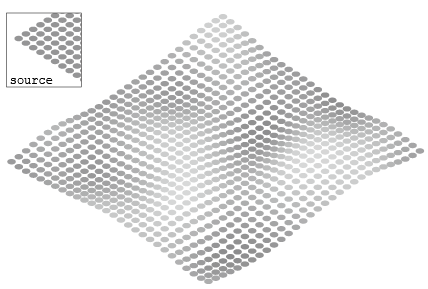
This script changes the colors of the selected paths using the noise.
I used "perlin-noise-simplex.js" by Sean McCullough to generate the noise, with the help of the article "Generative Art In HTML5" in the website of the author of the book.
It worked on Illustrator with "@include".

Please see my page on Github for details.
https://github.com/shspage/illustrator-scripts#noisefilljsx


The image below is an example with a modified version of the script.


I inserted this code at line 174. (After the line "_paths[i].fillColor = col;")
_paths[i].translate(0, - col.gray / 2);
Now the noise values influence the position of the paths.

I'm reading "NATURE OF CODE" by Daniel Shiffman now.
In its introduction chapter, it warns against an overuse of Perlin noise.
Noise is useful. But it narrows our view if we rely on it too much.

Feb 14, 2014

distributeOnThePath.jsx

distributes the selected objects in the equal distance on the foreground path in the selection.

USAGE: select the objects and run this script.

test env: Adobe Illustrator CC (Win/Mac)

download: bg_distributeOnThePath.zip -> http://shspage.com/ex/files.html

rotateTowardPoint.jsx


rotates the objects in the selection toward the center of the foreground object.

USAGE: select the objects and run this script.

test env: Adobe Illustrator CC (Win/Mac)

download: bg_rotateTowardPoint.zip -> http://shspage.com/ex/files.html

Dec 6, 2013

handleGlue Extension 1.1.0 for AiCC


Assume you want to draw a shape like this with Adobe Illustrator.
You may think it's troublesome to connect the side lines smoothly with ovals.

This is a HTML5 extension for Adobe Illustrator CC that it can be a relief in such case.


It moves the selected end points of the foreground open path to the nearest point on the other selected paths.


How To Use : Select paths (anchor points to glue and the segments to glue to) and hit Run button.

You can set 3 optional values by editing the script.


mode "nearest" : moves the selected end points of the foreground open path(s) to its anchor point's nearest point on the other selected segments.
The handle is rotated to the tangent's angle at the point.

mode "angle" : moves the selected end point of the foreground open path(s) to its inner handle's nearest tangent point on the other selected paths.
If the segment is straight, (and the handle of selected point is parallel to it), selected end point is moved to its nearest point on it.

"multi" checkbox : If checked, it moves all the open path in the selection. Otherwise, it moves only the foreground open path.
If checked and all the selected paths are open path, the last (most background) path is treated as "the other path".

"add anchor" checkbox : If checked, it adds an anchor point at the point on the path that the selected anchor moved to.

"Undo" button performs undo.  I placed this button because the keyboard-event is caught by panel and doesn't reach to application during the panel activated.
After undo, all the anchor points are selected.  So "Run - Undo - Run" sequence can cause an unexpected result.

Note 1: Works only on Illustrator CC (or later?)

Note 2: A warning dialog will appear during installation since the embedded certificate is self-signed. Continue installation if you trust me :)

The envisioned usage of this extension is, so to speak, drawing roughly and snapping tight with easy action.  So please don't use this for the purpose like accurate measuring of the nearest point.


download: aicc_ext_handleGlue110.zip
download: aicc_ext_handleGlue111.zip / 2013.12.07 fixed a bug
download: aicc_ext_handleglue112.zip / 2013.12.07 embeded small icons. added an alert when no anchor is selected in the target path.

download: handleGlue 1.1.3 / 2013.12.10 The link is the description page on Adobe Exchange.  You can install it from Adobe Exchange panel under Windows menu of AiCC / modified to remove outside handles in "angle" mode. fixed typo in messages.

Tested: Adobe Illustrator CC (Win/Mac)

Distributed under the MIT License.
See the license notice during installation for details.

Nov 24, 2013

new Layer Extension for AiCC (ver.1.2.1)


This is a modified version of Adobe Illustrator CC Extension I posted previous time.  This extension adds a new layer of custom selection mark color above the active layer.

It uses Brackets and CC-Extension-Builder-for-Brackets.
(ref: http://davidderaedt.github.io/CC-Extension-Builder-for-Brackets/)

I rearranged the buttons in one line for the usage of attaching this panel to the bottom of the layer palette.

The "auto" button sets the color according to the neighboring layers.  Other color chip buttons set the color of each button.
When the checkbox is checked, each button changes the current layer's color instead of adding new layer.  The checkbox gets unchecked when mouse leaves from the panel.

The bundle ID has changed from the previous version.  Please remove the previous version before you install this version.

download: aicc_ext_newLayer121.zip -> http://shspage.com/ex/files.html

Tested: Adobe Illustrator CC (Win/Mac)

Distributed under the MIT License.
See the notice during the installation for details.

Nov 17, 2013

new Layer Extension for AiCC

This is my second project in Adobe Extension Builder 3 PREVIEW.  The first was "Demo" that had a "Hello Illustrator" button.  I found this is a quite easy tool to assign scripts to a palette.


The "auto" button creates a new layer above the active layer.  Its selection mark color is one of the colors below the button.  The colored buttons creates a new layer that has each button's color.

download: aicc_ext_newLayer.zip -> http://shspage.com/ex/files.html

Tested: Adobe Illustrator CC (Win/Mac)
Free to use and distribute. No warranty.

Feb 10, 2013

dupAlongThePath.jsx


Added a script for Illustrator dupAlongThePath.jsx to my Github repository.

This script duplicates the foreground selected object on the rest of selected paths with specified interval.

It is similar to the script "Dup At Selected Anchors.jsx" I uploaded before.  But this one duplicates the object along the path in equally interval regardless of the anchor points.
In addition, the duplicated objects are rotated to the normal direction of the path.  And they are scaled with the specified range.  Set 0 for the fluctuation range if you don't want to scale them.

I'm not sure whether we can get this kind of result by Brush tool.  At least, with Brush tool, we can't limit the scale direction of each duplicated object only toward x or y axis. (I'm not also confident about it.)  Anyway, I'm sure I can use the each part of internal process for the other various purposes in the future.

Visit the following page to view the code.


Note:
The rotation is processed according to the angle of the line connecting the previous and next duplicate points. So the object isn't duplicated at the both end points of the open path.

Jan 27, 2013

grass.jsx


Added a script for Illustrator grass.jsx to my Github repository.

Visit the following page for details.


Note:
This is a script ported from the script I wrote for Scriptographer(Sg) once. It took about a hundred lines to implement the part I had been able to write shortly with Sg function getPositionWithLength. It would be better if I could use paperjs on Illustrator. Even better thing is to get rid of Illustrator as an only tool for vector graphics.

Jan 24, 2013

batchTextEdit.jsx


Added a script for Illustrator batchTextEdit.jsx to my Github repository.

Visit the following page for details.


Note:
I stumbled when I found I couldn't input the return code in the edittext control.  It seems it is a FAQ.  I had to hit Ctrl + ENTER to do it.  In CS6, there's a new attribute "wantReturn" and I can do it just hit ENTER if it is set to true.

Apr 30, 2012

Join the separated lines of 3D/CAD data


Recently I received a mail from the owner of the site ADi Kiteboarding.
He said that he wanted to edit the data exported from 3D application, but the lines are separated and couldn't be connected each other properly even he used my script "Join Reasonably.js".

I'd heard sometimes that some people were also using "Join..." script to join the lines the data of 3D/CAD application.  So I tried to write one to be able to join the lines like this kind of data.  This time I post this one with the agreement of Adi.

Received data was like the above image(left).  It was constructed from the paths like the above image(right).   Some part of the paths were overlapped.  So complicated.

It seemed that connecting from point to point needed a complex algorithm.
So I decided to use the segment ( the line between 2 anchors ) as a unit.
The script breaks all the paths into segments and removes overlapped segments.  Then it connects the segments if its end points are closer than the threshold (0.1mm).  If there's no more near point, it creates another path from the rest of paths.

As a preparation, like the red line of the above image(left), connect the points that too far away, and delete the branched lines.   Then select all the paths you want to connect, and run the script.  The overlapped paths and the isolated points are deleted by the script.

Edit the settings in the script if needed.

As a specification for now, like the above image(right), the script cannot work as you expect in the case that only lines are overlapped and points are not.

download: join_reasonably_2.zip -> http://shspage.com/ex/files.html


Tested with Adobe Illustrator CS5 15.0.2 / Windows XP SP3
This is a beta software. Please use it carefully, at your own risk.


Jan 9, 2012

paper.js with pressure + SVG generation

Yesterday, I read about getting a tablet pressure data with javascript using Wacom webtablet plugin.  I was just thinking if there were pressure function in paper.js, so I tried using them in combination.  The link below is a implementation for now.  The touch of drawing requires further tuning.

Also I added SVG data generation function which I'm working on it these days.  Please click the link "generate svg" to show a textarea.  Then copy the text and create a new file.

(It doesn't work with Internet Explorer on my environment. I'm sorry for that.)

Could you draw...?
Wacom says that webtablet plugin is installed at the same time in installation of recent wacom tablet drivers.  Why I said "says" is because I couldn't get it working at first.  If wacom's demo page also doesn't work , please try a different way to install.

Searching related articles, I realized that getting a tablet pressure data with javascript was a topic from almost 1 year ago.  Since I thought I couldn't keep up with Web technology, I had been keeping away from it.  But if I can implement such a thing easily with it, It would be a waste not to use it.

About SVG data generation function, TextItem, GradientColor and several minor svg attributes aren't supported yet.  According to the mailing list of paper.js, SVG output function is under planning.  Even if it is implemented, the function of mine will be useful for my study about SVG.
Generating the data that properly open with Illustrator or Inkscape was hard work for me.  I'll write about it another time.  For now, in Illustrator, there's a problem that the size of the symbol is not correct.


Jan 8, 2012

paper.js -> svg

Finally recently, I'm playing with HTML5 Canvas.
I thought there must be a drawing tool like Illustrator which created with HTML5.
But I couldn't find it for now.  So I decided to try creating it.

A svg data which is being edited with Inkscape in above image was generated from "Arcs.html" which is one of the examples included in paper.js download.


This one is from SpiralRaster.html.

It can be useful even if it only has a function that output a svg data.
I'll post the code when I can properly implement it.

Jun 12, 2011

connect_centers_nearest_modified 2


Here's a little tutorial about the script that I uploaded yesterday.
The source objects are the brush objects in Fig.1.  The red one is the foreground (last drawn).  And the distance between the farthest removed objects is about 88pt.
Select all the brush objects, then run the script.
A prompt dialog appears.  Input 80 and hit OK.
Fig.2 is the result.  Paths are separated because the distance between the nearest object is longer than the specified value (80pt).

Jun 11, 2011

connect_centers_nearest_modified

I thought about how to create the objects to connect these centers by the script that I wrote previous time. And remembered a software Voronoi Stippler that I used a few years ago. (For some reason, it seems that it is unavailable for download now.)

I made the objects from an image with this tool, then applied the connect_centers_nearest.js script to them ... and got an error due to the upper limit of the number of points that setEntirePath function allows.

So I rewrote a part of the script as follows. Then I ran it again.
//path.setEntirePath(points);
for(i=0; i<points.length; i++){
with(path.pathPoints.add()){
anchor = points[i];
rightDirection = anchor;
leftDirection = anchor;
}
}
It seemed to be interesting. But it looked also like an ugly entangled string. So I implemented the idea of the maximum distance of the line to the script. If the distance between the points is longer than the limit, the script finishes the path and begins a new path from the next point.
This seems to be good? I posted this script at the end of this article.

In the archive, the script with .js extention is for windows. And .jsx is for Mac. When you run this script, you are asked the maximum distance in point. (Actually, it is the maximum squared distance. This is not appropriate. But I leave it as it is for now.)
Talking about the code, I put 0 instead of the coordinate [x, y], at the point that separates the paths.

download: aics_script_connect_centers_nearest_modified2.zip -> http://shspage.com/ex/files.html

2011.06.12 -- fixes length_limit to be squared 

May 28, 2011

connect centers in various order


These scripts create a path that traces the center of the selected objects. The path starts from the center of the foreground object. And the order of the connection vary from script to script. If the number of points is greater than two, the path is closed.
I thought the "farthest" is unexpectedly interesting.

download: b_aics_script_connect_centers.zip -> http://shspage.com/ex/files.html

Tested with Adobe Illustrator CS5 15.0.1 / Windows 7 Pro 64bit
This is a beta software. Please use it carefully, at your own risk.

And
I bought macbook pro recently. Though I don't have Illustrator works on it yet. I must be familiar with Xcode first.

May 30, 2010

I installed AI CS5

The most important change in this version I noticed is a change in the coordinate system.
I must apply a little fix to several of my scripts to let them work with CS5.

Take a look at "Changes in CS5" section in "Illustrator CS5 Scripting Guide" PDF document for the details.